Reviews-App
The review process
djep features a simple review process where reviewers can work their way through all submitted proposals and given them a rating between -1 and +1. -1 means that they don’t think that a proposal should be part of the final schedule while +1 means it should be. There are also -0 and +0 give the reviewer the option to incline towards one or the other.
The reviews themselves are not visible to the author of the proposal but only to staff members and members of the program committee.
If the reviewer has questions for the original author they can submit them through the “comments” field right below the proposal’s text. The proposal author receives a notification about that and can interact through this feature with the reviewer.
If the proposal author then decides to edit a proposal e.g. due to feedback from reviewers, a new version of the proposal is created and those reviewers that already created a review are notified about the change.
Once the review phase is over (configurable through the conference model instance) no reviews can be added or updated anymore.
Available views
The app provides a handful of views for proposal authors, reviewers and staff members:
- List of available proposals currently reviewable. For staff members this also includes a cumulated score and a link to the actual reviews.
- List of reviews created the current user
- Proposal details: From this view the reviewer and author can communicate through comments and can access previous versions of a proposal. Reviewers can also access the review form to create or change a review.
- Review form: Form for creating and updating a review. There is also a button for deleting the review.
- Proposal version: Simplified view on a specific version of a proposal.
Export der bewerteten Proposals
Zur einfacheren Auswertung der Proposals, können diese zusammen mit ihrem aktuellen Score über den Admin-Bereich exportiert werden. Die entsprechende Aktion befindet sich unter “/admin/reviews/proposalmetadata/”.
Um hier nun sämtliche Proposals zu exportiert, wählt man zuerst sämtliche Session-Vorschläge aus (hierzu gibt es auch einen Shortcut in der linken oberen Ecke) und wählt dann unter “Aktionen” “Als CSV exportieren” aus:
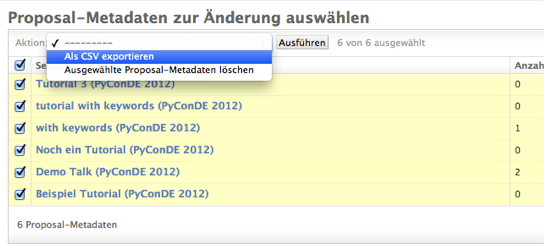
Proposals können über den Proposal-Metadata-Bereich zusammen mit dem aktuellen Score exportiert werden.
In diesem Export sind folgende Daten enthalten:
| Header | Beschreibung |
|---|---|
| ID | ID des Proposals |
| Title | Aktueller Titel des Proposals |
| OriginalTitle | Ursprünglicher Titel wie er während der Proposal-Phase eingetragen wurde |
| SpeakerUsername | Benutzername des Vortragenden |
| SpeakerName | Voller Name des Vortragenden wenn vorhanden, ansonsten Benutzername |
| CoSpeakers | Voller Name der Co-Speaker mit “|” getrennt |
| AudienceLevel | Level |
| Duration | Dauer der Session |
| Track | Ausgewählter Track |
| Score | Gesammelter Score zur aktuellen Zeitpunkt |
| NumReviews | Anzahl der derzeit vorliegenden Reviews zu diesem Proposal |
Alternativ kann dieser Export auch über den Befehl “export_proposal_scores” durchgeführt werden.